Scanning Docker Images for Vulnerabilities in CI Pipelines
Catch vulnerable container images before they reach production.
87% of public container images carry at least one high-severity CVE, and most teams still ship them without a scan touching the pipeline. That gap between how fast Docker adoption grew and how slowly scanning practice caught up is the entire subject of this piece: what a scanner does, which tools fit which job, where in the pipeline each check belongs, and how to write policy that actually stops a bad image instead of just logging it.
Docker's own numbers make the stakes clear. Developer use jumped 17 points in a single year according to the 2025 Stack Overflow survey, the largest one-year rise of any technology tracked, and Docker Hub now handles more than 20 billion image pulls a month. Sysdig's Cloud Native Security Report puts the rise in breaches involving vulnerable images at 300% between 2022 and 2025. None of that is surprising once you look at the default workflow most engineers still follow: pull a base image, stack a few layers on top, push. Scanning happens somewhere in there if it happens at all, and often it's bolted on after the fact, a manual audit run by someone on the security team weeks after the image already reached production.
That's the expensive way to find out about a problem. According to wiz.io, remediation costs run three to five times higher once a vulnerable image has already shipped, compared to catching the same flaw in CI before it ever gets built. So the question worth answering isn't whether to scan. It's what a pipeline that actually blocks vulnerable images looks like in practice, stage by stage, tool by tool.
What a scanner actually does to a Docker image
Every Docker image is a stack of layers: an OS base, system libraries on top of that, a language runtime, then whatever application dependencies your build pulls in. Any one of those layers can be carrying a known CVE that's been sitting in a vulnerability database for months.
A scanner's job breaks into three steps, and none of them is complicated once you see them laid out. First, it extracts a software inventory from every layer in the image, essentially asking "what packages, at what versions, are actually in here." Second, it cross-references that inventory against vulnerability databases, things like the NVD, OSV, and distro-specific advisories from Debian, Alpine, and Red Hat. Third, it maps whatever it finds to CVE IDs, CVSS severity scores, the affected version ranges, and whether a fix exists yet.
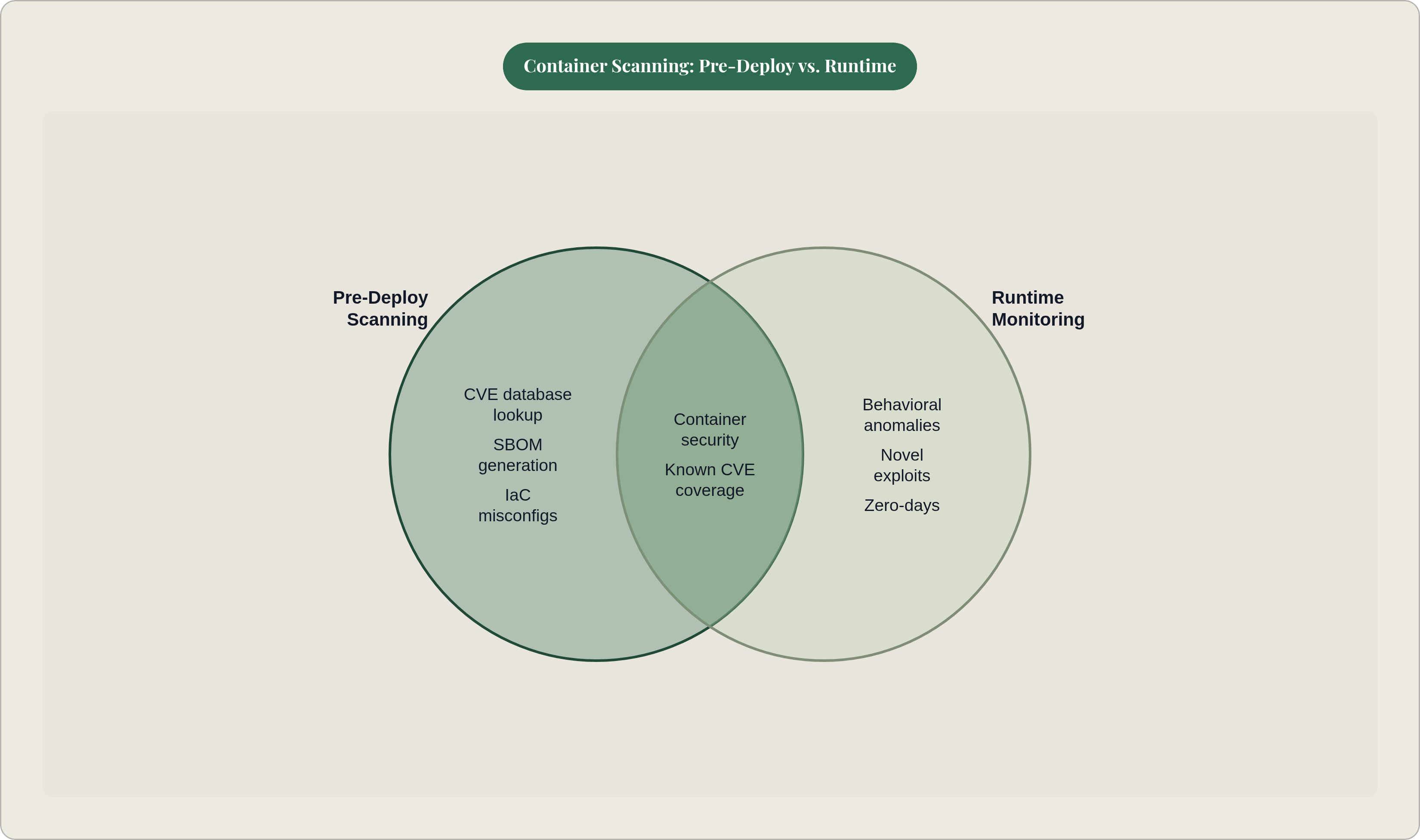
Worth being precise about the three surfaces here, because teams often conflate them. Image scanning inspects the built container for known CVEs in its software inventory. Configuration scanning is a different job entirely: it looks at your Dockerfile and Kubernetes manifests for insecure settings, running as root, exposed ports that shouldn't be exposed, missing resource limits. Runtime scanning is the third leg, and it monitors containers that are already running for behavior that looks off. That third one isn't a substitute for the first two; it's the complement, catching what pre-deploy scanning structurally cannot.
And structurally, there's a lot pre-deploy scanning cannot catch. Zero-days without a CVE record yet, logic flaws in application code, novel exploits nobody has cataloged, none of that shows up in a database lookup no matter how good the scanner is. Runtime monitoring closes part of that gap, but no combination of tools eliminates the risk. It's worth sitting with that limitation for a second, because it reframes what a "passing" scan even means: it means nothing dangerous that's already known about is in this image today. Tomorrow is a different question.
That's also the case for keeping the SBOM, the Software Bill of Materials, that most scanners can generate as a byproduct in CycloneDX or SPDX format. It matters for two reasons: compliance audits want it, and it lets you re-scan later without rebuilding the image from scratch. A CVE published the day after your image ships won't show up in yesterday's scan no matter how thorough that scan was. That single fact is the reason a CI pipeline, on its own, is never a complete answer, and it's the thread that runs through the rest of this piece.
The main scanning tools and where each one fits
Trivy, from Aqua Security, is probably the most common starting point, and for good reason. It's a single binary that scans container images, Kubernetes manifests, infrastructure-as-code like Terraform and CloudFormation, and even source code, all from one tool. It keeps its own offline vulnerability database, updated daily, so scans don't depend on live network calls to third-party services. Free, fast, and it plugs into essentially every CI system without friction.
That said, there's a caveat worth taking seriously heading into 2026. Trivy's distribution channel was compromised twice in March 2026, first with a malicious v0.69.4 release and force-pushed action tags on March 19, then with malicious images showing up on Docker Hub on March 22, both documented in Aqua's GitHub security advisory GHSA-69fq-xp46-6x23. The practical response is to pin and verify Trivy releases rather than pulling latest blindly, and some teams have since moved their SBOM generation over to Syft or cdxgen as a hedge.
Grype, from Anchore, takes a narrower focus: vulnerability scanning for containers and filesystems, paired with Syft for SBOM generation. Where Grype shines is the SBOM-first workflow. It accepts SBOMs in CycloneDX and SPDX directly, which means you can generate the SBOM once at build time and re-scan it later against an updated database without touching the image again, something as simple as running grype sbom:./sbom.json on a nightly cron job. Teams running a formal supply chain security program tend to gravitate here because the Syft integration is tighter than what Trivy offers natively.
Docker Scout pulls from 23 advisory database sources and returns CVE IDs, CVSS v4 scores where available, affected version ranges, and remediation steps. It ships pre-installed with Docker Desktop 4.17 and later; on Linux CI runners you'll need to install the Scout CLI plugin separately. Its real strength is developer experience: it surfaces fix recommendations right alongside the CVE data, integrates directly with Docker Hub, and generates SBOMs in both major formats. The free tier covers continuous analysis for one repository, and Team or Business plans unlock unlimited Scout-enabled repos, along with a policy evaluation engine for enforcing standards across pipelines.
Snyk Container detects CVEs with CI/CD integration built to surface problems early, and its reporting leans developer-focused: it prioritizes fixes by contextual risk rather than raw severity, and it integrates with a wide range of registries. It's most useful layered on top of a free scanner rather than as your only tool, on the repos where a SaaS dashboard, PR annotations, and license scanning actually earn their subscription cost.
So how do you pick? Start with Trivy for most teams, it's free, fast, and covers the most ground, but pin releases carefully given the March 2026 incident. Layer Snyk on top for the developer-experience gains on your most critical repositories. In regulated environments or anywhere SBOMs are central to the compliance story, Grype paired with Syft is the stronger combination. And in the most heavily regulated environments, running two independent scanners against two different databases catches more between them than either one catches alone. Docker Scout fits naturally when a team already lives inside the Docker ecosystem and wants recommendations surfaced at the Hub or Desktop level rather than in a separate dashboard.
Where in the CI pipeline to place each scan, and why placement matters
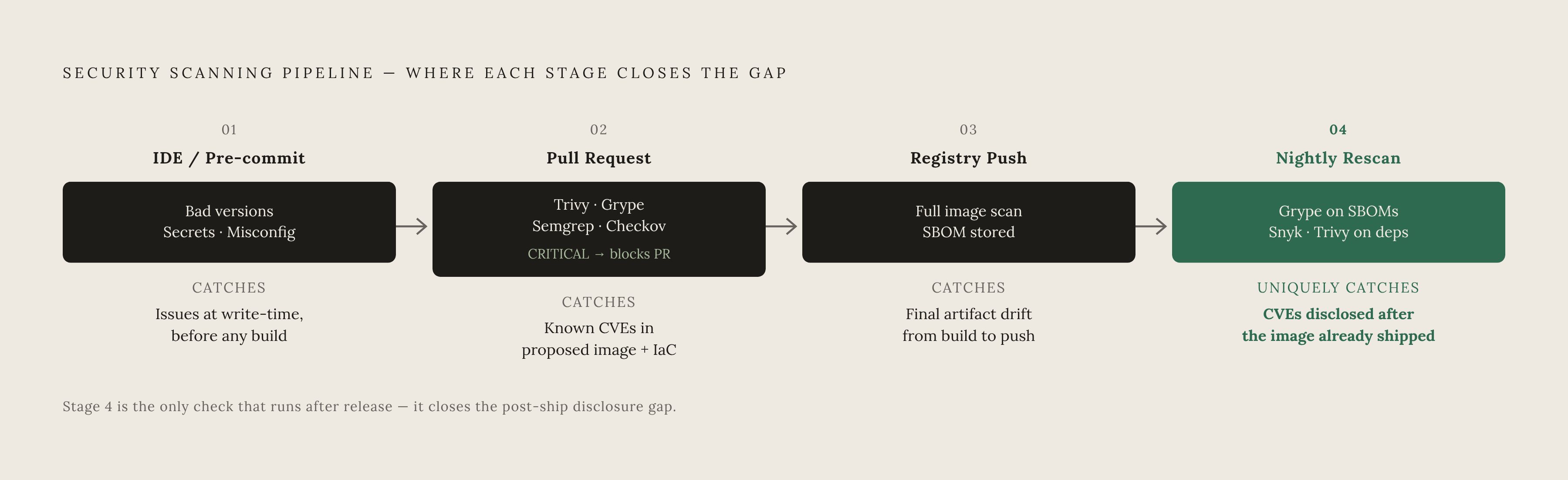
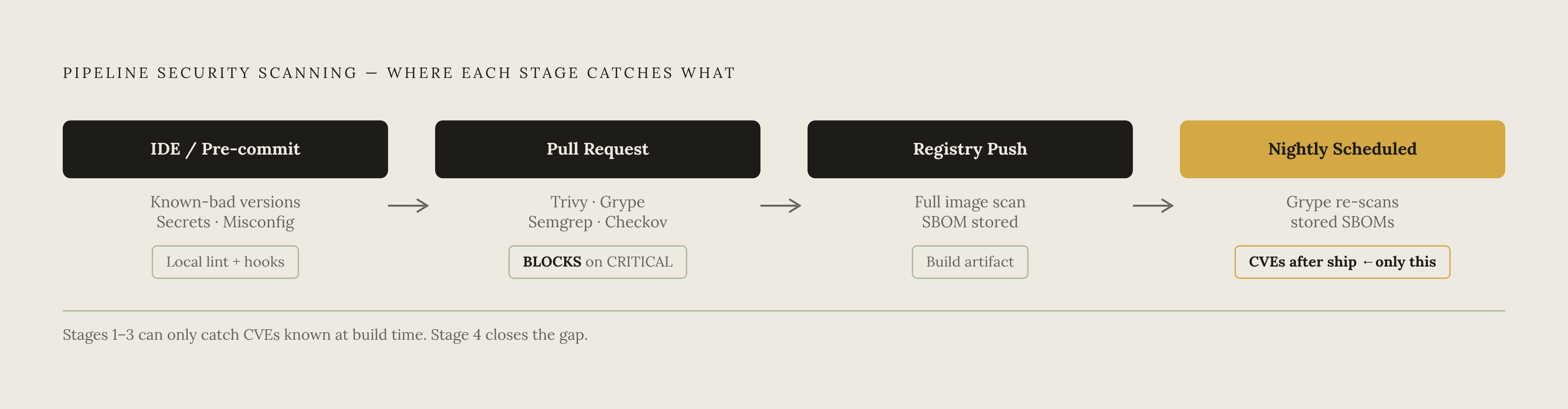
Shift left doesn't mean fewer gates. It means earlier feedback, and the two are not the same thing. A pipeline that scans once, right before deploy, has one shot to catch everything. A pipeline that scans at multiple stages catches different failure modes at each one, and that's the design worth building toward.
Stage one is the IDE, or pre-commit. A plugin like the Snyk IDE integration, or a tool like Semgrep, catches problems as the code is being written, before a commit ever touches the pipeline. This is the lowest-friction place to fix anything, because the developer hasn't mentally moved on to the next task yet. It's the right stage for known-bad package versions, secrets accidentally left in code, obvious misconfigurations.
Stage two is the pull request check. Run Trivy or Grype against the changed container image, Semgrep for SAST on changed files, Checkov on changed infrastructure-as-code. This is where blocking policy should actually live, failing the PR outright on CRITICAL findings. One underrated detail here: Trivy, Grype, Semgrep, and Checkov all emit SARIF output, and that feeds directly into GitHub's Security tab. That gives you a centralized view across every tool without standing up a separate SIEM.
Stage three sits at the registry push, a full scan of the final built image right before it goes into the registry. This catches things that build steps introduce but that source code never showed, compiled artifacts, or a base image that got updated mid-build without anyone noticing. Store the SBOM as a build artifact right here. It becomes an auditable record of exactly what shipped, and in compliance workflows, "we scanned it at build time" is not sufficient once new CVEs surface weeks later. The SBOM is what lets you answer "were we exposed" without re-running the whole build.
Stage four is scheduled, run nightly. A full-repo scan with Snyk or Trivy against pinned dependencies catches CVEs that got published after the last build ran. Pair it with Grype re-scanning stored SBOMs, and you're catching newly disclosed vulnerabilities against images that are already deployed, which is precisely the gap that pure pipeline scanning cannot close on its own.
Put together, this four-stage pattern catches CVEs disclosed after the last build, vulnerabilities that slipped in through a base image update mid-build, and IaC misconfigurations that never show up in the image itself. Single-stage scanning, no matter how good the tool, misses all three.
Writing pipeline steps that actually block vulnerable images
Here's the part teams skip, and it's the part that actually matters. A scanner producing output is not the same as a pipeline that blocks a bad build. Without a policy decision attached to the output, all you've built is a very expensive log file.
Start with severity thresholds tied to exit codes. Most tools, Trivy, Grype, Scout, support something like --exit-code 1 once findings cross a severity threshold you set. A sane default is to block the build on CRITICAL, and let MEDIUM and LOW findings surface in the report without failing the job. That threshold should be a decision the team makes once and writes into the pipeline config, not something re-argued in every PR thread.
Then there's the triage SLA, and this is where alert fatigue either gets managed or doesn't. CRITICAL findings block the PR immediately, full stop. HIGH findings get tracked and must be resolved within a sprint, not left open indefinitely. MEDIUM gets tracked but doesn't block anything. Engineers act on alerts when the signal-to-noise ratio is high; a blanket "fail on any CVE, no matter how minor" policy trains people to suppress warnings rather than fix them, which defeats the entire purpose.
Allowlists exist for a reason, but they need guardrails. Trivy has .trivyignore, Grype has .grype.yaml, and every scanner supports some version of a per-finding exception. Use it sparingly, and attach a mandatory expiry date to every entry. An exception with no expiry date is not an exception; it's permanent drift away from your own policy, and six months later nobody remembers why it's there. Require a comment on every ignored finding explaining why it's ignored and when it gets revisited.
Route SARIF output into one place. Trivy, Grype, Semgrep, and Checkov all emit it, and feeding it into GitHub's Security tab keeps findings in the same workflow developers already use for code review, rather than a separate dashboard that gets checked once a month, if at all.
One more thing that undermines everything above if it's skipped: pin your base images to a digest, not a floating tag. FROM python:3.12 looks stable, but the layer behind that tag can change between builds without any signal to you. A scan that passes today against a floating tag is not a guarantee of anything tomorrow, because the thing you scanned may not be the thing you build next week.
Keeping images clean after they ship: registries, SBOMs, and continuous re-scanning
A scan that passes at build time is a snapshot of the vulnerability databases as they stood that day. Nothing more. That's not a flaw in the tooling; it's the nature of the problem, and it's why the work doesn't end once the image is in the registry.
Docker Hub with Scout enabled supports automatic rescanning both on push and when a new CVE gets disclosed, and many managed registries offer similar capabilities. Continuous scanning across registries can surface a newly disclosed vulnerability in an image you already shipped within hours of that CVE going public. Turn it on, and treat it as the safety net for whatever CI missed rather than a replacement for scanning in the pipeline.
The SBOM earns its keep here as the long-lived artifact. Store the SBOM generated at each build and you have an exact record of what shipped in that image. Re-scan it against an updated database without rebuilding anything, grype sbom:./sbom.json on a nightly schedule does the job. For compliance frameworks like SOC 2, HIPAA, or GDPR, this is the record regulators actually want to see: not just a statement that a scan happened, but a paper trail of exactly what was in the image and every CVE state since.
Runtime monitoring is the last line, and it's not interchangeable with anything discussed so far. It watches running containers for behavioral indicators of exploitation: unexpected process execution, network connections that don't match normal patterns, the kind of thing no vulnerability database will ever catch because there's no CVE for "this container is suddenly talking to a server it's never talked to before." It's not a substitute for pre-deploy scanning. It's the piece that covers what no scanner, however current its database, could have known.
And images age. One policy worth setting: any image that crosses a threshold age or accumulates too many newly disclosed CVEs since it shipped should automatically trigger a rebuild and rescan, not just a Slack alert that someone eventually gets to.
Scanning AI-generated code in containers requires a harder isolation boundary
A 2025 Veracode report found 45% of AI-generated code fails security tests, code that, by definition, no engineer reviewed line by line before it ran. That statistic changes the isolation question for anyone running containers that execute code an AI model wrote.
Standard containers are built on an assumption: the code inside is trusted. That assumption doesn't hold for AI-generated code, and the reason is structural, not just a matter of being extra careful. Every container on a host shares that host's Linux kernel, which means a kernel-level vulnerability gives an attacker a direct path out of the container and onto the host itself. November 2025 brought three runc vulnerabilities, CVE-2025-31133, CVE-2025-52565, and CVE-2025-52881, that hit Docker, Kubernetes, containerd, and CRI-O all at once. Scanning the image catches known CVEs sitting in the software stack. It says nothing about what code running inside that container will actually try to do once it's executing.
So what does the harder boundary look like? Hardened containers sit at one end: lowest overhead, but they're built for trusted workloads, and AI-generated code doesn't qualify as trusted by any reasonable definition. gVisor is a meaningful step up: it intercepts system calls in user space before they ever reach the host kernel, which narrows the attack surface considerably without the full weight of a separate VM. MicroVMs, Firecracker and Kata Containers being the names most people know, go further still, giving each workload its own dedicated kernel with hardware-enforced boundaries between it and everything else on the host. That's the same isolation model AWS Lambda runs on, and a Firecracker microVM boots in roughly 125 milliseconds with minimal memory overhead, which is fast enough that the security gain doesn't cost you much in practice.
Vulnerability scanning tells you what's already known to be wrong with the software sitting in your image. It was never built to answer what happens when the thing running inside that image was written by a model instead of a person, and the isolation boundary is the piece of this puzzle that scanning alone was never going to solve.